Draw the trade. It sizes it to your risk.
A TradingView-style long and short box on your MT5 chart. Drag your stop and target, and it sizes the trade so that if the stop is hit you lose exactly what you chose. Send the order from the same window, then manage the trade once you're in: move your stop to breakeven, trail it, or close part of the position.
No payment · any MT5 broker · runs on MT5 on a laptop or PC
On your phone? Email me the link
We'll email you the trial link and the installation guide, to open on your computer. Just this one email.
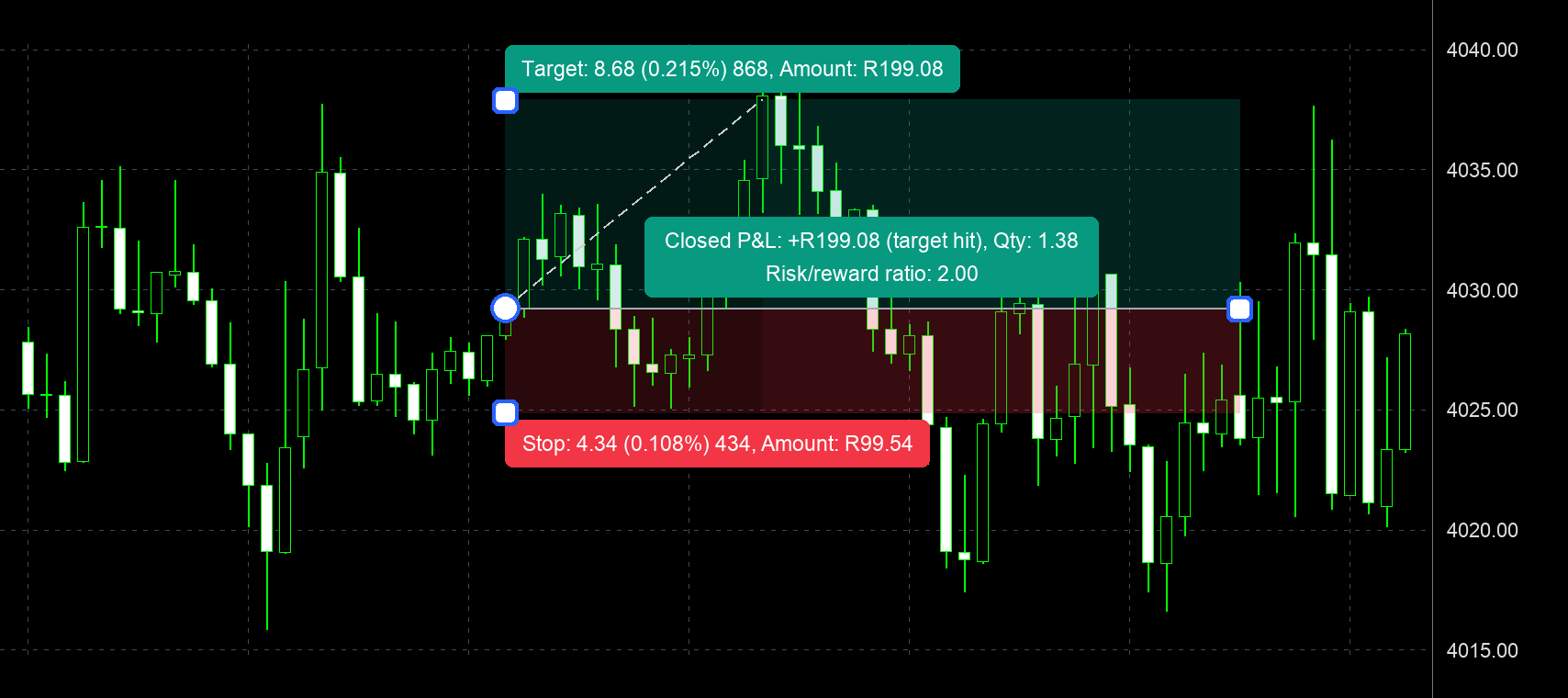
Move the stop. Watch the size change.
This is the sum the tool does for you on every trade. Set an account and a risk, then drag the stop and the target: a wider stop means a smaller position, so the money at risk stays the same.
From the box to the close, all on the chart
Real screenshots from MetaTrader 5. The toolbar sits in the top-left corner of the chart; drag it wherever suits you.
- 1
Place the box
Click + Place at current and choose Buy or Sell: the box appears at the live price with the order window open. Or click + Place anywhere and draw it, on any candle, at any price. Drag up for a buy, down for a sell.

- 2
Set your stop and target
Drag the square on the red edge to your stop, where your idea is proven wrong, and the square on the green edge to your target. The lot size, risk and reward update as you drag. Drawn on past candles, the box replays against the real candles, like TradingView.
- 3
Check it, then send it
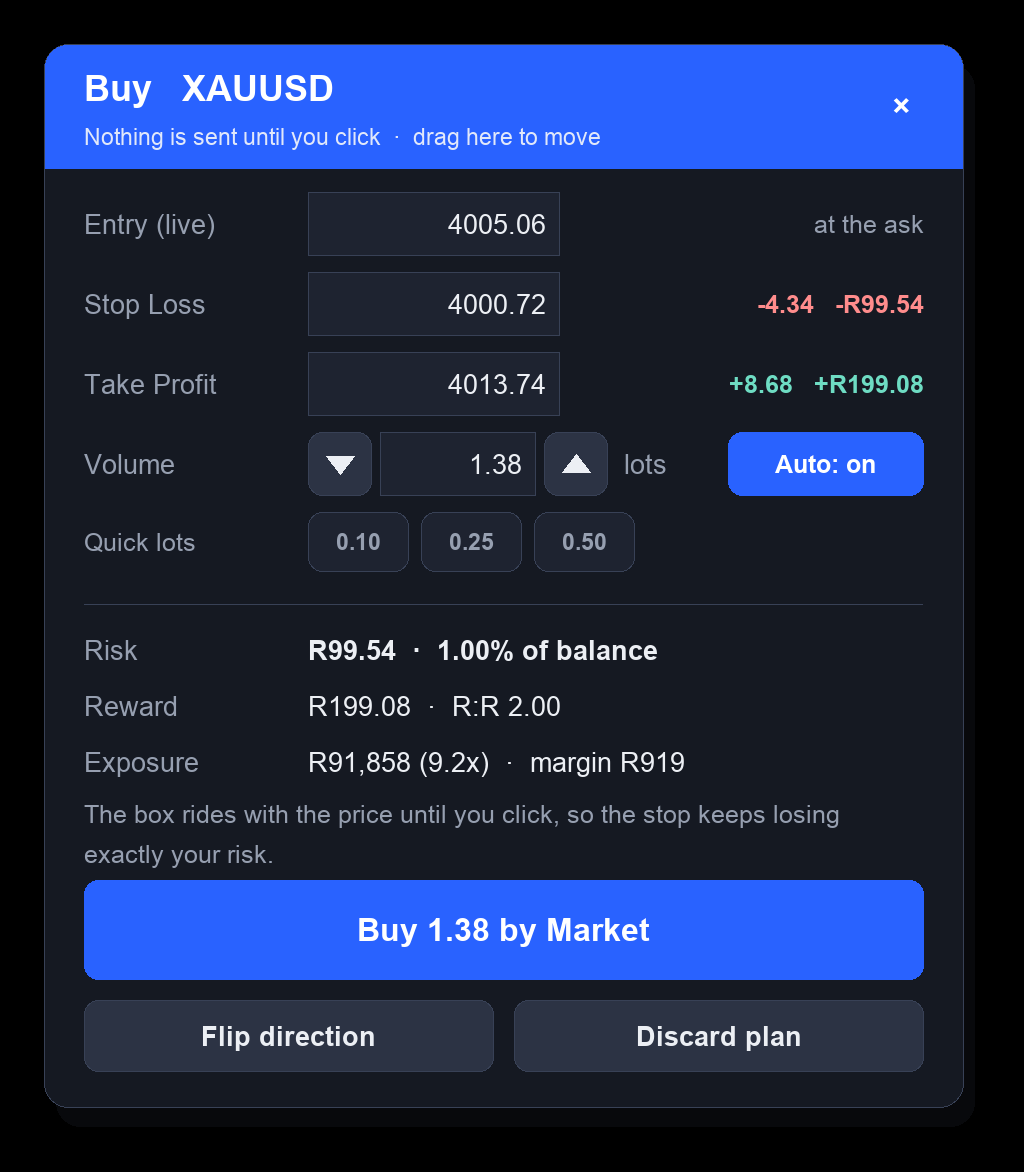
The order window shows the entry, stop, target and lot size, and what you risk and stand to make. Change the size with the arrows or a quick-lot button if you want to. Nothing is sent until you click: Buy by Market at the live price, or a Buy/Sell Limit or Stop when your entry is away from the price.
- 4
Manage the open trade
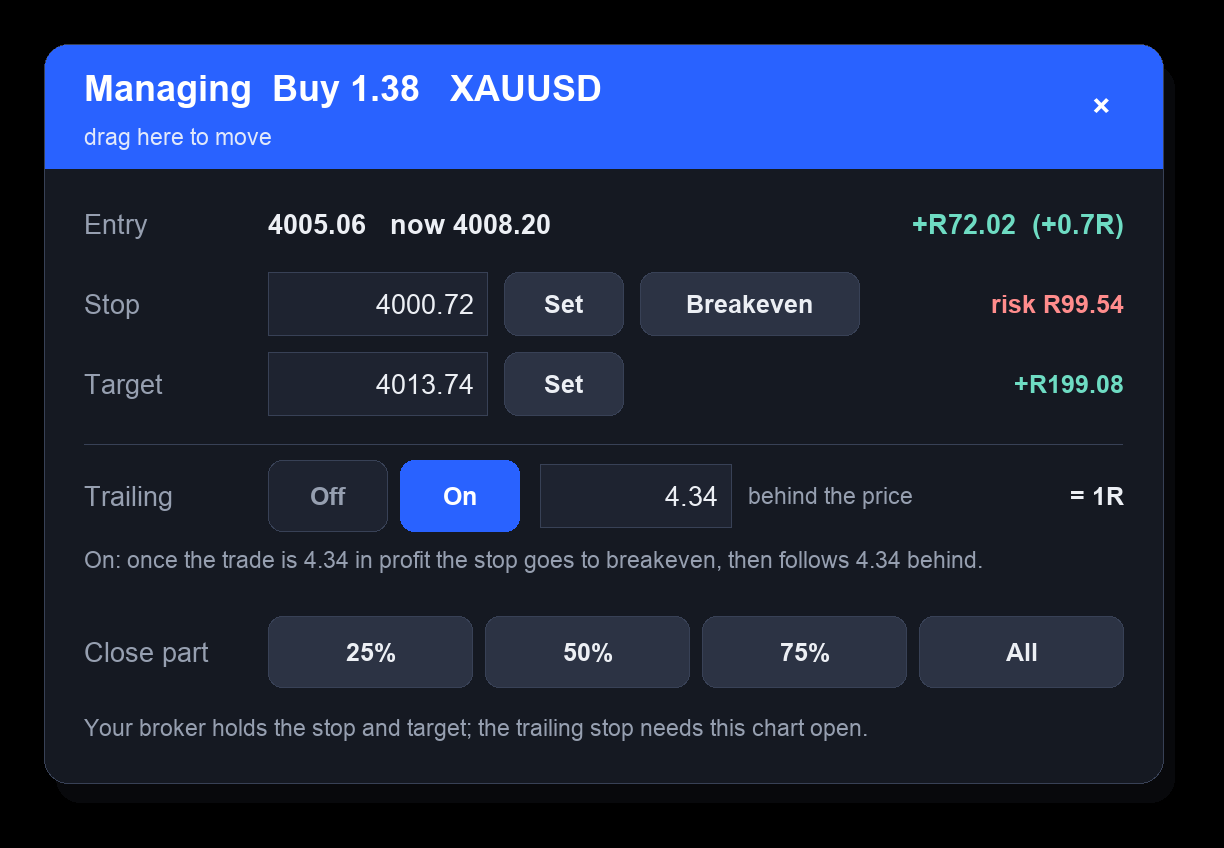
When the order fills, the Manage window opens. Move your stop or take it to breakeven, change or remove the target, switch on a trailing stop, or close 25%, 50%, 75% or all of the trade. Each button acts straight away, and your profit or loss is shown in money and in R.
- 5
See today's news
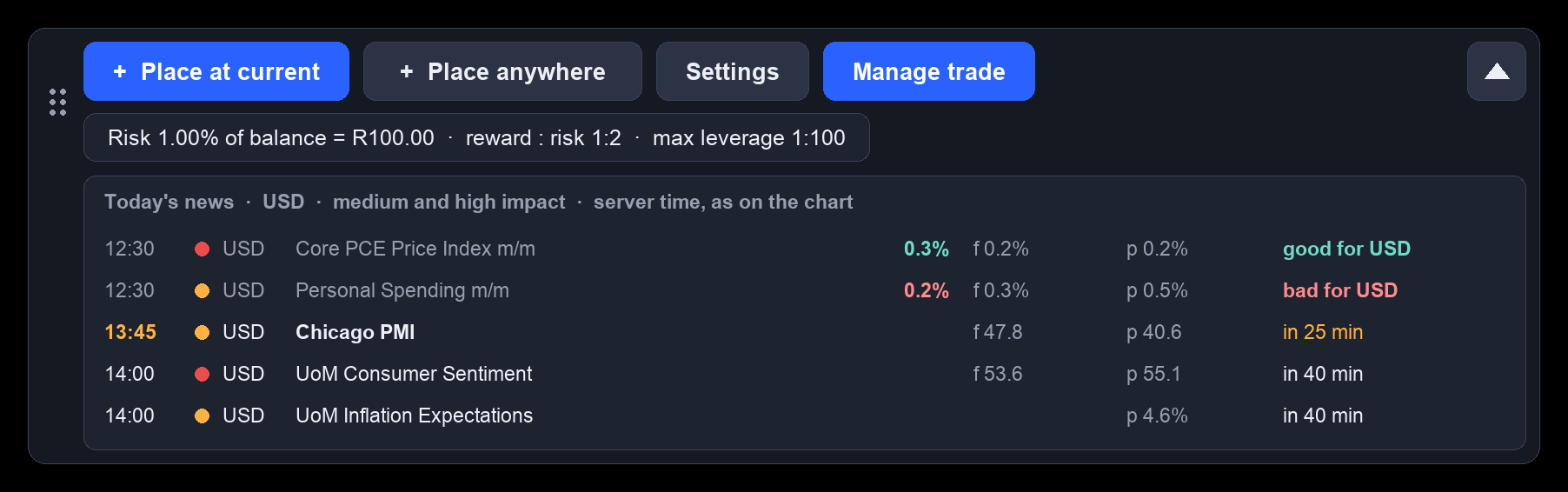
Open the drop-down on the toolbar for today's economic news for your chart's currency: the time, the impact, the forecast and the result, and whether it came out good or bad for that currency. An amber dot tells you news is due within 30 minutes.
- 6
Your risk, your way
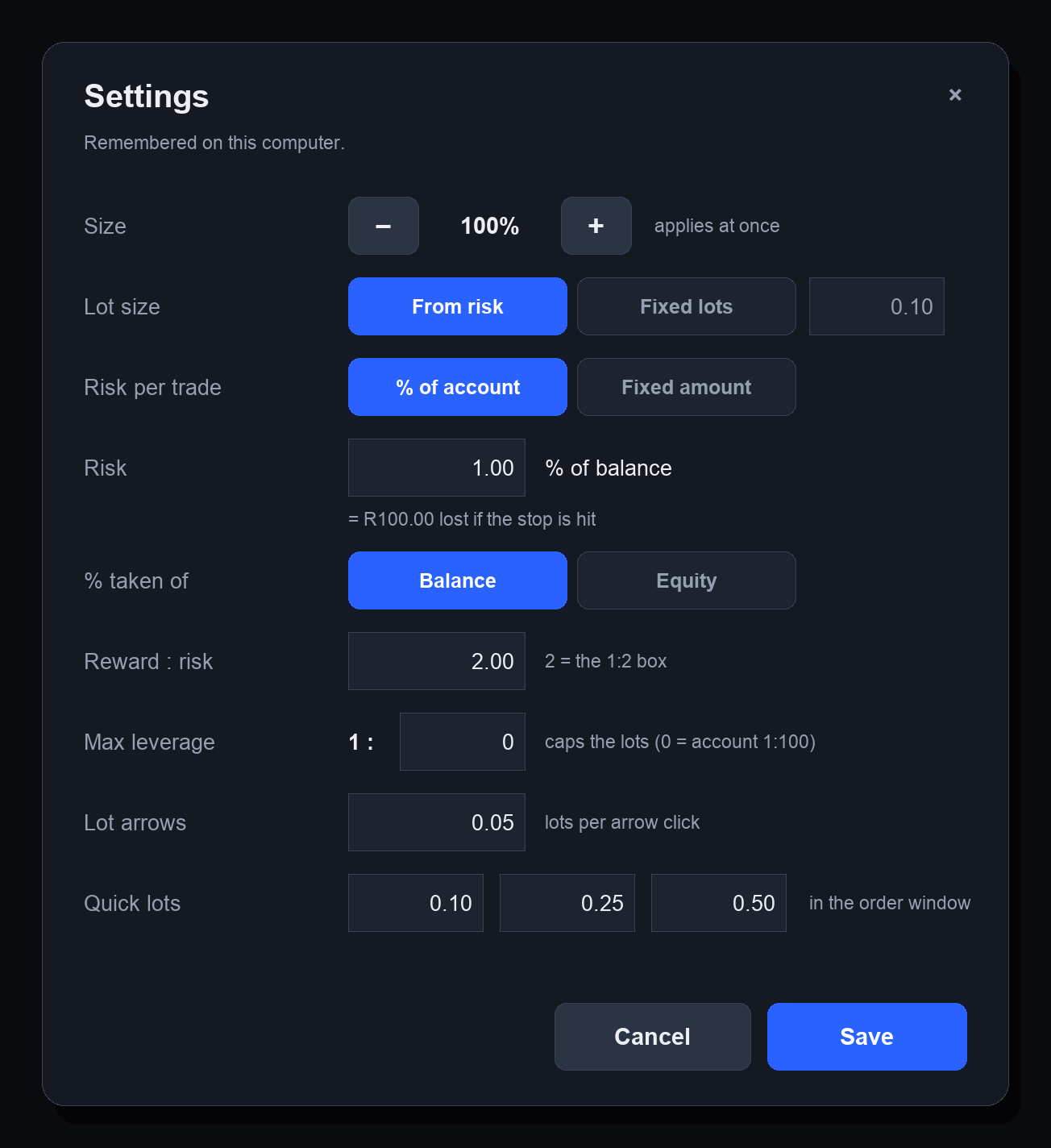
In Settings, size each trade from your risk (a % of your balance or equity, or a fixed amount) or use a fixed lot size. Set your usual reward : risk, cap the size with a maximum leverage, and choose the lot-arrow step and your three quick lots. It remembers your settings on that computer.
Your risk ÷ what one lot loses at your stop
Rounded down to your broker's lot step, so you never risk more than your setting. That's why you'll often see 0.99% instead of 1.00%.
- Uses MetaTrader's own calculator: your broker's contract size, tick value and account currency.
- Market orders are sized from the price you'd actually get (the ask for a buy, the bid for a sell), so the spread is included.
- If the smallest lot already risks more than your setting, it tells you in amber.
- Not included, just as when you work it out by hand: slippage, overnight swap and commission.
Every trade keeps its box
Pending orders
Keep their box with a dashed entry line until they fill.
Open trades
The box pins to your fill and shows your live P&L, and whether a trailing stop is on. Click it to manage the trade.
Your last closed trade
Keeps its box with the result: target hit or stop hit.
Trades you place yourself
Get a box too, and so do trades you opened with the MM Risk Tool. Trades from other Expert Advisors are left alone.
A log of every order and change
Saved in your MT5 data folder (MQL5 → Files → MM_TradeManager_log.csv).
Any MT5 broker
Forex, gold, indices and synthetics, any timeframe. Money is shown in your account currency.
What it does
- Works out the lot size for the stop and risk you choose.
- Shows what you risk and stand to make before you send.
- Sends the order you set up, when you click.
- Moves your stop, trails it, or closes part or all of a trade, when you choose to.
What it doesn't
- Choose your entries, stops or targets, or say whether a trade is a good idea.
- Trade on its own, or touch trades from other Expert Advisors.
- Forecast anything: a box replayed on past candles is hindsight, and the news list shows what came out, not what price will do.
Ready in a few minutes
The installation guide we email you shows every step on Windows and Mac.
Try it free, then choose
Same tool on every plan. Pay by EFT; it switches on as soon as we confirm your payment.
R0 for 7 days
The full tool on your MT5 account. No payment, nothing to cancel.
Start free trialR200 a month
Pay for a month at a time. Renew early and the new month starts when the current one ends.
R1,750 a year
Twelve months, paid once: about R146 a month.
Questions about the tool
Already using the MM Risk Tool?
Is it an indicator?
Does it trade for me?
Does the trailing stop work when MT5 is closed?
How does the free trial work?
How do I pay, and when does it switch on?
Which brokers and accounts does it work with?
What does it send to your server?
Is the lot size exact?
Can I use it with another EA?
Trading carries a high level of risk and you can lose some or all of your capital. The MM Risk & Trade Manager helps you size, place and manage a trade, but it can't guarantee the result: in fast markets, around news or over weekend gaps, a stop can fill beyond its level and you can lose more than the box shows. Nothing it shows is financial advice. Risk disclosure.